
Three ways to explore
- Learn and browse22 topics and 265 questions in the bundled library
- Connect ideasA source-linked research graph with 3D and 2D views
- Play triviaRoom-based questions, teaching moments and rankings
Catholic learning, research and trivia · Public beta
Learn the faith. Explore the connections.
Explore Catholic questions, source-linked arguments and a 3D knowledge graph. Browse the library, switch between 2D and 3D views, and discover room-based trivia in the public beta.
Web, installable web app and Android preview · Catholic lens with attributed comparative perspectives
Three ways to explore
See the app
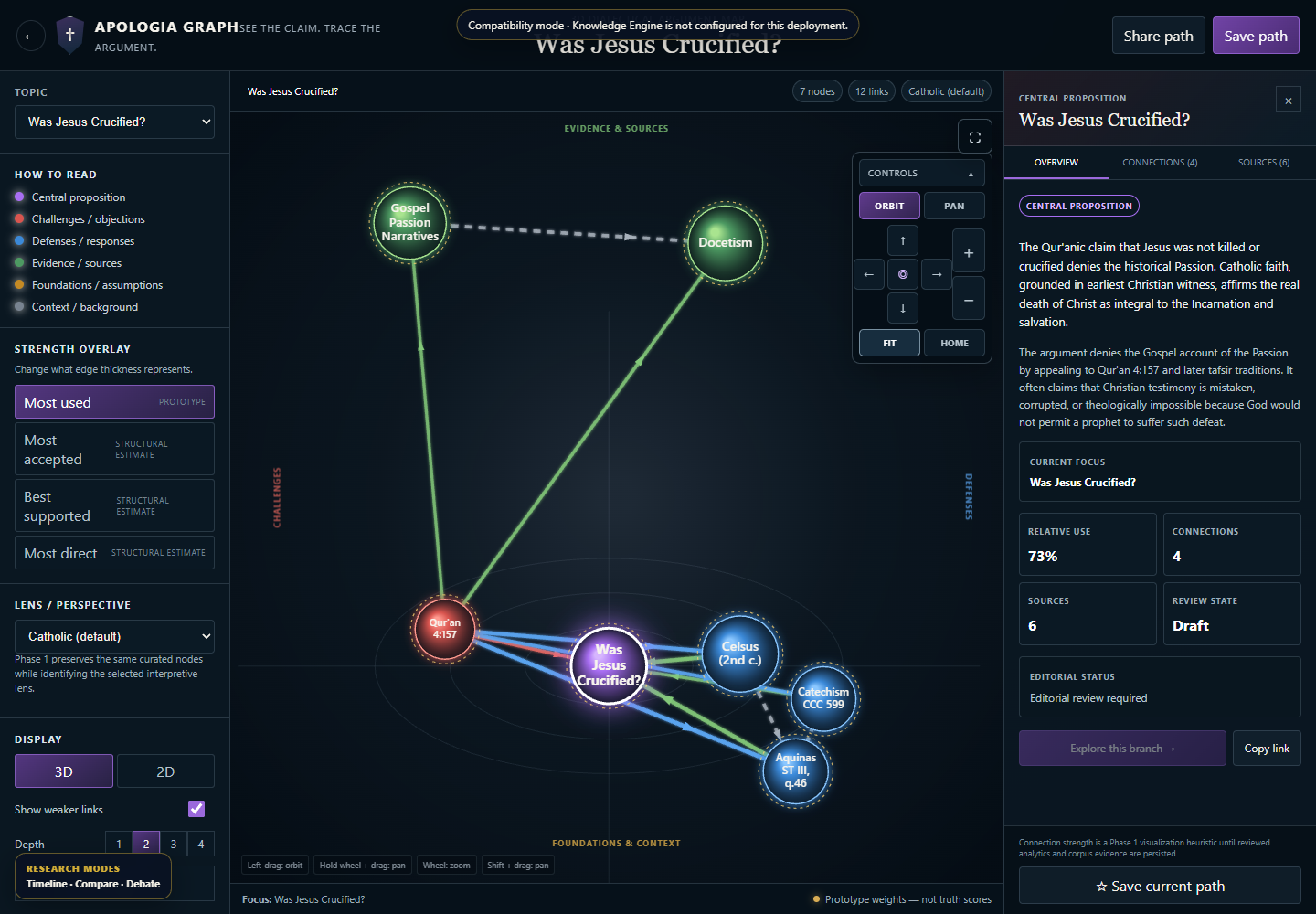
Original screenshots from the public web app and Apologia Graph, captured on 22 October 2026. Current compatibility and service-availability notices are retained. No quiz room was joined or score created.
One question, more context
Apologia Sancta brings Catholic learning, apologetics research and trivia together. Its separate Apologia Graph workspace connects claims, objections, responses and source references, with an interactive 3D Galaxy and a 2D view. The current bundled library contains 22 topics, 265 questions and 494 cited references. The public beta exposes the available catalogues while clearly identifying editorial review states and service-dependent learning, research and live-quiz features.
01
Orbit, pan and zoom around a connected argument map. Select a proposition, objection, response or source to inspect its context. Adjust exploration depth, use the keyboard-accessible node list, or switch to the 2D view.
Open the 3D Galaxy →02
Browse apologetics topics by tradition and subject. Open an argument’s overview, Catholic response, source dossier and historical timeline. Follow reference links, copy citations, bookmark records or export a research record.
Browse Apologia Graph →03
Search 22 topics and 265 questions with 494 cited references in the current bundled catalogue. Filter by subject, difficulty, era and content type; open a collection to browse questions and expand their multiple-choice options.
Explore the library →04
Choose a host’s room or use a shared room link. The quiz interface brings timed multiple-choice questions, locked answer selections, teaching moments and room or global rankings together. Live play and scoring require an available quiz service and an active room.
Open live trivia →05
Move between claims, objections, responses and evidence. The research hub also provides Timeline, Compare, Debate and saved-journey entry points. These advanced modes depend on the Knowledge Engine; the current graph runs with its curated compatibility catalogue.
Visit the research hub →06
Use the browser experience, install the web app where supported, or choose the published Android wrapper. Learning programmes and official progress depend on published lessons, an account and the learning service; the current live learning catalogue has no published lessons yet.
Check the learning catalogue →Pricing and access
The public library and graph can be opened without a checkout. No paid plan prices or subscription checkout are published in the current interfaces. This beta includes working public catalogues and visual tools alongside features that still depend on unavailable services.
Public beta
Bundled topics and questions can be browsed without signing in. Answers are hidden in library browsing.
Available in compatibility mode
The curated catalogue and visual map are accessible. Records still display their editorial review state.
Room and connection required
Choose an available room. A preview question or timer before joining is not proof of an active scored game.
Service dependent
The Knowledge Engine was unavailable during this check. No live lessons were published, and solo practice could not load.
The current public library and graph can be opened without a checkout. No paid plan prices or subscription checkout are published in these interfaces, so this page does not quote an unconfirmed price or sell access. Availability and future pricing may change during the beta.
No. The current strength overlays are labelled as prototypes or structural estimates. They help visualize connections; they do not establish that a theological claim is true, accepted or reviewed. Check the record’s sources and editorial status. Seed catalogue records still require accountable theological and primary-source review.
They offer two views of the same selected argument map. The 3D view supports orbit, pan and zoom; the 2D view provides a flatter layout. Selecting a node opens its details and source context. A keyboard-accessible node list provides another way to navigate the visible graph.
The bundled library provides a question-browsing fallback when the Engine is unavailable. Live trivia, accepted answers, rankings and official learning progress require the relevant online services. The separate solo-practice service could not load during this check, so offline scored practice is not advertised here.
Guest graph bookmarks and paths save in this browser on this device. Account-backed research saves require the learner-account connection and available services. Guest data does not upload automatically. Keep exported copies of work you want to retain before clearing browser storage or changing devices.
Android 1.0.3 is the currently published APK and is listed in the DoCHEng download centre as a preview. Its published file and checksum are verified; installation and signing have not been independently accepted here. It wraps the hosted app and still depends on its services. Supported browsers can install the web app; on iPhone, use Safari’s Add to Home Screen.
Keep learning within reach
Use the web app directly or install it through a supported browser. Android 1.0.3 is the current published wrapper, listed as a preview with its file details and SHA-256 checksum in the download centre. Live rooms and account features still rely on the hosted services.